
The question comes up a lot. Someone has a mobile app idea, they’ve started talking to developers, and suddenly there are two very different paths on the table with very different price tags attached. Native apps. Hybrid apps. Both build apps that end up in the App Store or on Google Play. But what they are, how they work, and what they’re good for are genuinely different in ways that will matter long after launch day.
Native and hybrid apps represent two distinct approaches to mobile app development, and the difference between them goes well beyond code. It affects how your app feels in a user’s hand, how quickly it responds, what it costs to build and maintain, and how much flexibility you have as the product scales. This guide breaks down both options clearly, with enough specifics that you can make an informed decision rather than just trusting which app developers happen to be in the room.
What Are Native Apps
A native app, also called a native application, is built specifically for one platform using that platform’s own programming language and development tools. On iOS, that means Swift or Objective-C with Apple’s Xcode environment. On Android, it means Kotlin or Java with Google’s Android SDK. A native mobile app lives entirely within the operating system it was built for, giving it direct access to every native device feature the hardware offers, camera, GPS, biometrics, accelerometer, secure storage, and push notifications, without any middleware layer in between.
The features of a native app go beyond just what it can do. They tend to feel different in a tangible way. Native apps load fast, animate smoothly, and behave exactly how users on each platform expect. iOS apps respond to gestures the way Apple users are accustomed to. An android app follows Material Design conventions without any adaptation needed. That consistency is the core advantage of native builds, and it shows immediately in how the product feels on the device. The app speaks the platform’s native development language directly, with no translation layer slowing things down.
Understanding native and hybrid apps starts here, because the performance and security floor of a native build is the baseline everything else gets measured against. Native features like biometric authentication or hardware-level encryption are fully and directly accessible. But native apps need significant investment when you want to reach users on both platforms. To develop a native app for iOS or Android means maintaining separate codebases and separate update tracks. The Apple App Store and Google Play each have their own guidelines and review processes. Native apps require more upfront resources, but they consistently deliver a level of performance and security that other approaches work hard to match.
What Are Hybrid Apps
A hybrid mobile app uses web technologies, primarily HTML, CSS, and JavaScript, wrapped inside a native shell that allows it to run on multiple platforms from a single codebase. That shell contains a WebView component, which works similarly to a web browser embedded inside a mobile app. From the outside, the hybrid mobile app looks and installs like any other mobile app. Under the hood, the core logic is web-based, which is what makes hybrid apps both versatile and occasionally limited depending on the use case.
Hybrid app development frameworks like React Native, Flutter, Ionic, and Cordova sit at the center of most hybrid builds today. The features of a hybrid app have expanded substantially as these frameworks have evolved. Most standard mobile functionality, push notifications, camera access, location services, payments, is now accessible through plugins and bridge APIs. Hybrid apps offer real flexibility for businesses that need to ship on both platforms without the cost and time of building twice.
Hybrid apps are built on the principle of write once, run everywhere. One codebase powers both iOS and Android, which significantly reduces development time and ongoing maintenance overhead. According to industry estimates, around 68% of enterprises choose hybrid development for those exact reasons, faster time to market and lower long-term cost of ownership.
What Are Examples Of Native And Hybrid Apps?
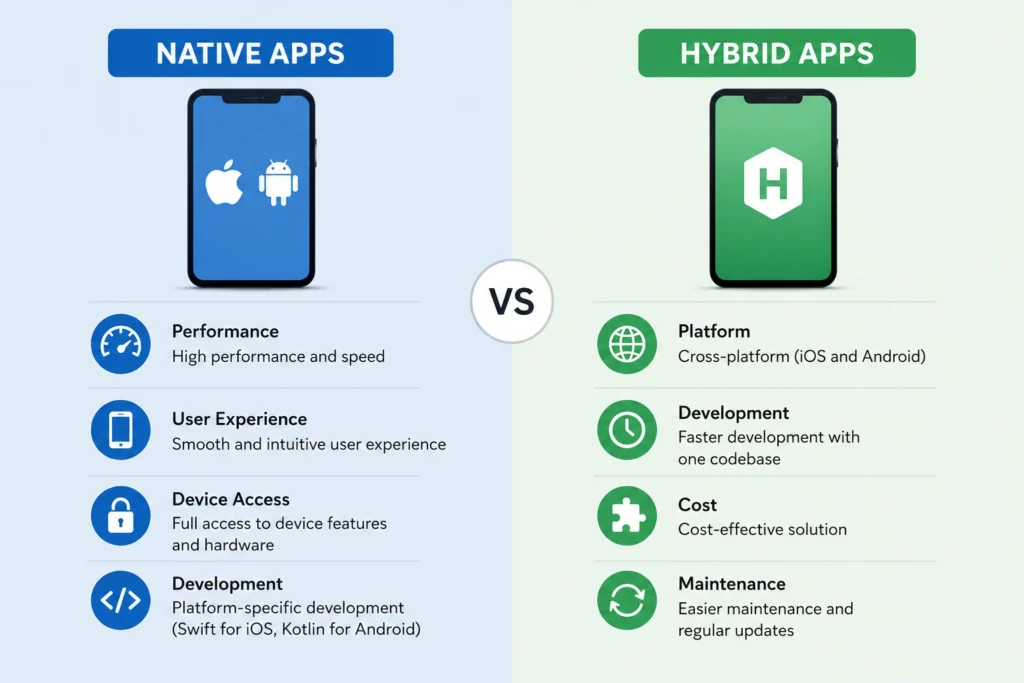
Seeing real products on each side of this comparison makes the decision feel less abstract.
On the native side, most mobile banking apps are built natively because security and performance are non-negotiable. Snapchat is a well-known native app, its camera functionality and real-time processing require the direct hardware access that only a native build fully provides. Most high-performance games on the App Store or Google Play fall into the same category, built native because the performance ceiling of anything else shows up too quickly.
On the hybrid side, Uber built its platform on a hybrid architecture to move fast across markets. Gmail uses hybrid elements across platforms. Pinterest has incorporated hybrid components throughout its development. These aren’t compromised products. They’re proof that a well-executed hybrid approach can serve millions of users at scale without sacrificing the experience.
Many larger apps blend both, using native code for performance-critical screens and hybrid components for content or utility sections. The divide in practice is often less absolute than the comparison suggests.
What About Progressive Web Apps?
Before committing to either path, it’s worth knowing that a third option exists. A web app, specifically a progressive web app, uses modern web technologies to deliver an app-like experience directly through a web browser, without requiring installation from any app store. They can work offline in limited conditions, support push notifications, and be added to a mobile device home screen.
Web apps vs native or hybrid are not really competing for the same use cases in most situations. Mobile web apps are accessed through the browser and work across any device without installation. But they carry real limitations around device API access, offline reliability, and performance. Understanding native and web apps as different tools helps clarify where each one fits. Web or hybrid app approaches both require installation via app stores, while a web app does not.
For most businesses building a customer-facing mobile application, the app development decision really comes down to native app vs hybrid. Progressive web apps are worth considering when you need a lightweight browser-accessible presence without the scope of a full build. But for anything that needs to feel and function like a proper mobile app, native and hybrid app development are the relevant options.
Native and Hybrid Apps at a Glance
Here’s a clear comparison of native and hybrid apps based on the key factors businesses need to consider. No app type wins on every dimension, which is exactly why the right choice depends on your specific product requirements.
- Performance: Native is faster and more responsive. Hybrid has closed the gap substantially but still trails for complex, graphics-intensive applications.
- Development cost: Hybrid is cheaper upfront. One codebase for both platforms costs considerably less than two separate native builds.
- Time to market: Hybrid ships faster. A single codebase means quicker iteration and earlier launch.
- Maintenance: Hybrid is simpler to maintain. One update covers both platforms rather than two separate deployment cycles.
- Device feature access: Native has full, direct access to everything a mobile device offers. Hybrid apps access native device features through plugins and APIs, which handles most use cases but occasionally hits limitations.
- Security: Native applications tend to carry fewer inherent vulnerabilities since there’s no web layer to expose.
- User experience: Native apps feel most at home on their platform. Hybrid apps may occasionally miss platform-specific UI conventions in edge cases.
The Cost and Timeline Reality
Numbers tend to settle the conversation faster than anything else. A native app development project built across both platforms typically runs from $50,000 to well over $200,000 depending on complexity. That reflects two codebases, two development workflows, and in many cases two separate teams. Ongoing maintenance carries the same multiplier. Every new feature gets built twice. Every bug gets fixed twice.
A hybrid app built to cover both platforms can often be developed for significantly less, since the same code powers both. Development moves faster, which reduces billable hours. Updates and bug fixes are applied once and deployed everywhere. For a business releasing its first mobile app or testing a concept before committing to a larger build, that efficiency is hard to argue against.
Many mobile apps begin as hybrid and migrate native components over time as revenue and scale justify the additional investment. The migration requires rebuilding parts of the product, but by that point the app has proven its value.
Which Is Better for App Development, Native or Hybrid?
There’s no objectively right answer. Native wins on raw performance, security, and platform depth. Hybrid wins on development cost, speed to market, and cross-platform maintenance. The better option is whichever fits your product requirements, timeline, and budget most closely.
With that in mind, some app ideas genuinely benefit from going native from day one. The performance ceiling of hybrid, while high for most purposes, does have edges that some products bump into early.
Native is typically the right call when:
- The app is graphics-intensive, real-time video processing, augmented reality, or gaming mechanics where performance headroom is non-negotiable
- Security requirements are strict, as in banking, healthcare, or legal mobile applications where any exposure in a web layer creates unacceptable risk
- The product needs to feel completely native, with custom animations and interactions that match the platform’s conventions exactly
- The budget and timeline support parallel development without compromising either platform’s quality
When Hybrid Makes More Sense
Hybrid isn’t a fallback. For a wide range of business applications, a hybrid approach is genuinely the right call and produces excellent outcomes. Consider hybrid when:
- You need to launch mobile apps on both platforms without doubling the budget or significantly extending the timeline
- Your app is primarily content or service-driven, a booking system, a client dashboard, a resource hub, or a customer-facing portal
- Speed to market is a priority because you’re validating a product idea or responding to a market window
- Maintenance simplicity matters, one codebase means one update cycle and fewer coordination costs
The line between the two approaches becomes clearest not in the technology specifications but in the product requirements. Mapping out what your app actually needs to do and who it needs to serve usually points toward one app type fairly naturally. And if you’re genuinely unsure, that’s not a bad sign. It usually means a proper conversation about your goals can make the decision obvious.
Not Sure Which Direction to Go? Let’s Work Through It Together
The decision between native and hybrid apps shouldn’t be made based on which sounds more impressive or which a developer happens to prefer. It should come from your product goals, your users’ expectations, your launch timeline, and what growth looks like over the next two to three years.
At DesignFxPro, we build both. We’ve worked across app types and business categories, and we approach every new project by understanding what you’re trying to build before recommending a technical path. Sometimes that’s native from the start. Sometimes it’s a hybrid application with a clear roadmap for where native components get layered in as the product scales.
Book a free consultation with DesignFxPro. We’ll look at your app idea honestly, ask the questions that actually matter, and give you a straight recommendation.