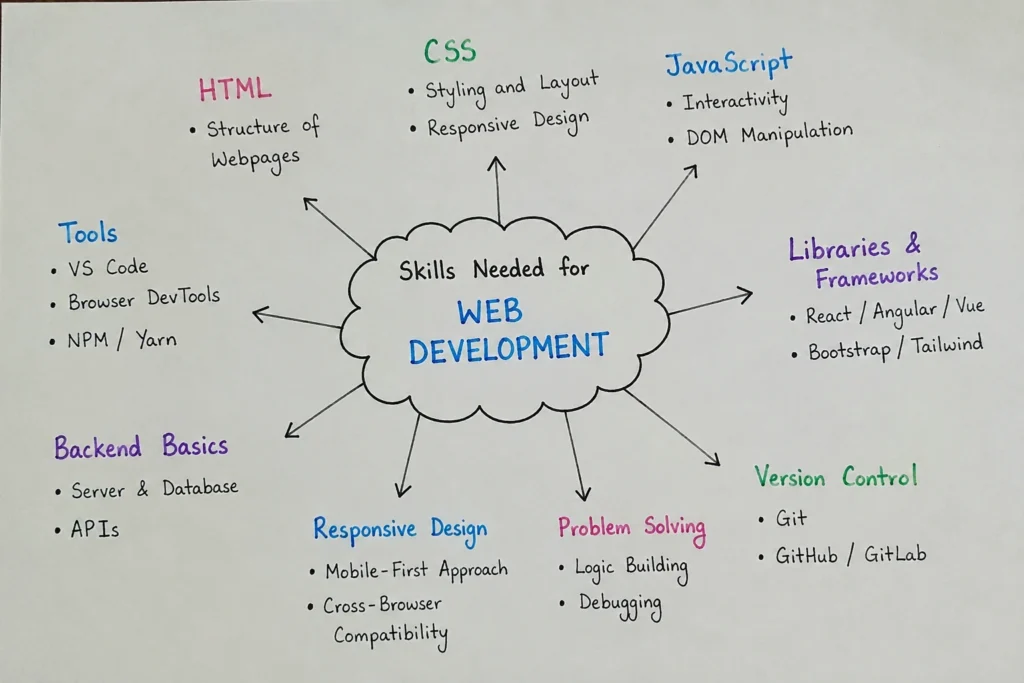
Most people picture web development as a person staring at code all day, headphones on, solving problems that look impossible to everyone else. There is some truth in that. Code is part of the work. But it is not the whole job, and honestly, it is not even the part that surprises most beginners.
The bigger surprise is how much web development depends on judgment.
A developer has to decide how a page should be structured, why a button is not getting clicks, why a site loads slowly, why a layout breaks on one phone but not another, and why a business owner is getting visits but no inquiries. That is where the work becomes more interesting. A website is not just a set of files. It is a place where design, search, content, user behavior, and business goals all meet.
At DesignFxPro, we see this often with startups, service businesses, law firms, and e-commerce brands. A site may look finished from the outside, but under the surface, something is missing. Maybe the pages are hard to update. Maybe the mobile version feels cramped. Maybe the site looks nice but does not help the business earn trust. This is why the skills needed for website development are wider than most people expect.
A good developer does not only ask, “Does this work?” They also ask, “Does this make sense for the person using it?”
Why Skills Needed For Web Development Are Not Just Technical
There is a difference between knowing how to write code and knowing how to build a useful website.
A beginner can learn HTML, CSS, and JavaScript and still struggle on real projects. That is normal. Real projects are messy. Clients change their minds. Images arrive in the wrong size. A plugin works during testing, then breaks after an update. A design that looked good on a laptop suddenly feels awkward on a phone.
This is where practical thinking matters.
Strong developers learn how to slow down and look at the whole situation. What is the website supposed to do? Who is using it? What action should visitors take? What might confuse them? What does the business owner need to manage after launch?
Those questions shape the build. Without them, a website can become technically correct but commercially weak. That sounds harsh, but it happens all the time.
HTML Is Boring Until You Realize It Holds Everything Together
HTML is often treated like the easy part. Many beginners rush through it because it does not feel exciting. It does not animate. It does not calculate. It does not look impressive in a portfolio by itself.
But HTML is the skeleton of a webpage. If the skeleton is messy, everything placed on top of it becomes harder to manage.
Good HTML helps browsers understand the page. It helps search engines read the structure. It helps screen readers make content more accessible. It helps future developers understand what is going on without muttering at the screen for half an hour.
Clean structure saves time. It reduces confusion. It also makes redesigns and content updates less painful. A developer who respects HTML usually builds websites that age better.
CSS Teaches You Patience
CSS looks simple until something refuses to line up.
Anyone who has worked on a layout knows the feeling. You change one spacing rule, and something else shifts somewhere unexpected. The desktop view looks perfect. The tablet view looks slightly off. The mobile view acts like it has its own opinion.
It controls the visual side of the website, but it also teaches patience, restraint, and attention to detail. Good CSS is not about adding as many effects as possible. It is about creating a clean experience where people can read, move, click, and understand without friction.
For business websites, this matters directly.
- A messy layout can make a company look less credible.
- A hard-to-read page can make visitors leave.
- A poor mobile layout can waste paid traffic.
Design is not decoration when it affects whether someone contacts you or buys from you.
JavaScript Is Where Things Start Moving
JavaScript is usually the first language that makes a beginner feel like the website is responding back.
A button can open a menu. A form can check whether an email address looks right. A product filter can change results without reloading the page. A booking tool can show available times. Small actions like these make a website feel less flat.
But JavaScript also brings responsibility.
- Too much of it can slow a site down.
- Poorly written scripts can create bugs that are hard to trace.
- Third-party scripts can pile up quietly until the site feels heavy.
This is why one of the skills needed for web development is knowing when not to add something. That is not always easy. Clients like features. Developers like solving feature requests. But a simple website that loads fast and works clearly often beats a crowded one that tries too hard.
Real Development Means Thinking About The Visitor
A website can pass every technical test and still fail with real people.
Maybe the headline is unclear. Maybe the form feels too long. Maybe the service page answers the wrong question. Maybe the button says something vague like “Submit” when “Book A Consultation” would make more sense.
This is where user experience becomes part of development.
Developers do not need to become full-time UX designers, but they do need to notice how people move through a page. Where will the visitor look first? What information do they need before they feel comfortable? What might make them hesitate?
For a law firm, the visitor may be stressed and looking for help quickly. For an online store, they may be comparing price, shipping, and reviews. For a service business, they may just want to know if the company serves their area.
Those small differences affect how the website should be built.
SEO Should Not Be Added After The Site Is Finished
Search visibility is affected by structure, speed, headings, internal links, page titles, image handling, mobile usability, and content organization. Developers touch many of those pieces. If SEO is ignored during the build, the site may look fine but struggle to get found.
This does not mean every developer has to become an SEO specialist. But basic SEO awareness is part of modern web development skills.
A developer should understand why page speed matters. They should know why headings need order. They should avoid hiding important text in ways search engines cannot read easily. They should build pages that people and search engines can both understand.
Speed Is A Business Issue, Not Just A Technical One
Slow websites are annoying. Everyone knows that. But for a business, slow speed can also mean lost leads and lost sales.
A visitor who waits too long may never see the offer. Someone clicking an ad may leave before the landing page finishes loading. A shopper may abandon a cart because the checkout feels sluggish.
Performance work can involve images, hosting, caching, scripts, fonts, code size, and database behavior. It can get technical quickly. Still, the reason for doing it is simple. People are impatient online.
The Best Problem Solvers Do Not Pretend To Know Everything
There is a strange myth that good developers know everything from memory.
They do not.
They search. They test. They read documentation. They break things in a safe environment. They compare solutions. They ask better questions as they gain experience.
That is normal professional work.
A developer who can calmly investigate a problem is more useful than one who tries to look brilliant all the time. Real projects reward patience. The issue is not always obvious. A broken feature might come from a browser difference, an outdated plugin, a missed setting, a bad file path, or one tiny line of code hiding in plain sight.
Problem solving is one of the skills needed for web development because the job never stops presenting new problems.
Communication Saves Projects From Becoming Messy
A lot of project delays do not come from code. They come from unclear communication.
The client says they want a simple website. The developer hears “five pages.” The client later expects booking, payment, blog setup, email capture, and analytics. Nobody was trying to cause trouble. They just did not define things clearly.
A good developer learns to explain what is included, what is not included, and why certain choices matter. This is especially important when working with business owners who do not speak technical language.
They may not care about frameworks, hosting settings, or code libraries. They care about whether the site loads, whether customers can contact them, whether products sell, and whether the site can grow with the business.
Clear communication protects the project. It also builds trust.
Security Is Quiet Until Something Goes Wrong
Website security is easy to ignore when everything works.
Then one day a form gets spammed, a plugin creates a vulnerability, a site gets infected, or an admin account gets compromised. Suddenly security becomes very important.
Developers should understand the basics: strong passwords, SSL certificates, software updates, user permissions, backups, form protection, and safe handling of customer data.
Not every website needs enterprise-level security, but every website needs care. This is especially true for e-commerce brands, healthcare businesses, law firms, and any site that collects personal information.
Business Awareness Makes A Developer More Valuable
The strongest developers are not only thinking about how to build something. They are thinking about why it matters.
A service page is not just a page. It may be the page that brings in qualified leads. A product page is not just a layout. It may decide whether someone buys or leaves. A contact form is not just a form. It may be the bridge between a visitor and a sale.
That business awareness changes the work.
It helps developers make better choices about layout, speed, content placement, calls to action, and technical setup. It also helps them push back when a requested feature might hurt performance or confuse users.
This is where Web developer skills become more than technical ability. They become part of growth strategy. It is also where the skills needed for web development start to feel less like a checklist and more like business judgment.
Learning Never Really Ends
Web development changes quickly. New tools appear. Old tools become less popular. Platforms update. Browser behavior shifts. Client expectations rise.
There is no finish line, at least not in the usual sense.
But that is also what keeps the work interesting. A developer does not need to chase every new tool. In fact, chasing everything usually creates more confusion. The better habit is to build strong fundamentals, then learn new tools when they solve a real problem.
Curiosity matters. So does restraint.
Build With Skill, But Also With Purpose
The skills needed for web development include code, layout, performance, SEO awareness, security, testing, communication, and problem solving. But beneath all of that is one simple idea: websites are built for people.
They are built for the visitor trying to find an answer. They are built for the business owner trying to grow. They are built for the team that has to update them next month. When development keeps those people in mind, the finished site usually works better.
At DesignFxPro, we build websites with that balance. We care about how the site looks, but also how it performs, how it ranks, how it converts, and how easy it is to use after launch.
If your business needs a website that feels clear, works properly, and supports real goals, we can help you plan and build it with the right skills from the start.