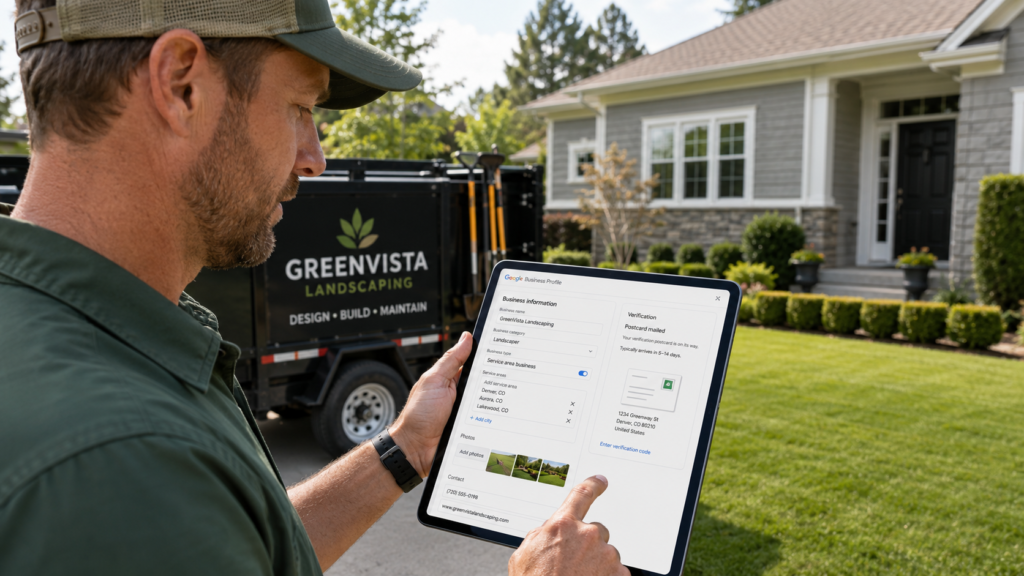
Your landscaping Google Business Profile is the best return you will get from an hour of marketing work, and a complete one earns around 70% more location visits than a half-finished one. Setting it up takes an hour or two, plus five to seven days waiting on a verification postcard. You claim the business on Google, set yourself up as a service-area business rather than a storefront, choose Landscaper as your primary category, list every city you genuinely cover, add real photos, and verify.
Here is what makes it worth doing properly rather than quickly. That profile is what decides whether you appear when a homeowner two streets away types “landscaper near me” tonight, and it is the first impression almost every prospective client will form of your business. It costs nothing, it runs constantly, and most of your competitors have left theirs half-built, which is the opening. Done properly, it does more for your visibility in local search than anything else you could spend an afternoon on.
This is a step-by-step walkthrough of how to set up your Google Business Profile from scratch, then the parts landscapers specifically get wrong, and the mistakes that quietly get profiles suspended in 2026. If you already have a profile, skip to the section on what to add after verification, since that is usually where the gaps are.
What Is a Service Area Business, and Why Does It Matter?
A service area business travels to customers instead of receiving them at a shop, which describes nearly every landscaping company. You hide your address and list the cities you serve instead, and getting this setting right determines where you appear. It is the foundation of local SEO for any business that drives to the work, and it is what lets you attract new customers in towns you cover but do not live in.
Most landscapers work out of a yard, a shed, or a home address, and none of those are places a client visits. Google handles this with a specific setting, and choosing it correctly matters more than people realise, because it shapes everything your landscaping Google Business Profile does afterward. Your profile appears on Google Search and Maps either way, but the service-area setting determines which local customers see it. If you list a home address publicly, you are telling Google customers come to you, which is inaccurate and can cause problems later. Hide the address, set your service areas, and Google understands you travel out to properties. The address still gets entered during setup, because Google needs to know roughly where you are centered, but it will not display publicly.
Setting Up Your Profile, Step by Step
The setup runs in a fixed order: claim the listing, choose your category, set the service areas, add contact details, then verify. Each step affects where you rank, so none of them are worth rushing.
Here is the sequence, with the parts that actually matter flagged:
- Claim or create the listing. Go to business.google.com and search for your business first. Google may have generated a listing for you already, in which case claim it rather than creating a duplicate, since duplicates cause suspensions.
- Set Landscaper as your primary category. This single field carries enormous weight, because it tells Google which searches you belong in. Then add secondary categories that reflect what you genuinely do, like Lawn Care Service, Landscape Designer, or Tree Service. Choose the primary one based on the work you most want, not the work you do most.
- Configure your service areas. Hide the address, then list the cities or postcodes you actually serve. You can add up to twenty, and they should sit within a reasonable travel distance, generally around a two-hour drive. Name real towns rather than a vague “greater area,” because specific city names match what people actually type.
- Add your contact details and hours. Your business name, address, and phone number need to match exactly what appears on your website and other listings. Mismatches here are one of the most common causes of ranking trouble.
- Verify the business. Usually by postcard, which takes five to seven days, though phone, email, or video verification is sometimes offered. Google requires you to verify your business before it will show properly, and an unverified profile barely appears at all, so this step is not optional. Once it is done, keep every detail up-to-date, because outdated hours or an old phone number stop people finding you just as effectively as no listing at all.
Once you are verified, the profile is live but not finished. The setup gets you eligible to rank; what comes next is what actually ranks you.
What Should Go on Your Landscaping Google Business Profile After Verification?
Photos, a written description, your full service list, and reviews. A complete profile earns roughly 2.7 times more consumer trust signals than a sparse one, and landscaping is a trade where people buy with their eyes.
Start with photos, because they matter more in this industry than almost any other. Upload at least five to begin with, and keep adding high-quality photos as you finish jobs. Before-and-after pairs perform exceptionally well for landscaping work, since transformation is exactly what you are selling and a finished lawn means little without the sight of what it replaced. Include your team, your trucks, and your equipment too, because businesses showing real people score higher on trust than those showing only finished work. In competitive markets, the top-ranking profiles often carry a hundred photos or more, and a profile with photos of genuine local work carries more credibility than any description could.
Then write the description. Say plainly what you do and where, something like a trusted landscaper in your city offering lawn care, garden design, hardscaping, and seasonal cleanups. Fill in the services section properly as well, listing each service you provide separately rather than lumping everything under “landscaping,” since that section feeds what Google can match you against. Irrigation repair, aeration, and pruning are all searched independently, and none of them get found if they sit buried in a paragraph. Use the posts feature to showcase seasonal services as they come around, and start collecting customer reviews immediately, asking after every job that went well. Taking half an hour to optimize your profile in this way is what separates a listing that exists from one that produces work.
What Landscapers Specifically Get Wrong
Three things, mostly: profiles that go silent in the off-season, service areas set once and never revisited, and photos with no before-and-after structure. All three are specific to how seasonal this trade is.
The off-season one costs the most and almost nobody notices it. Landscaping profiles tend to follow the workload, busy from March through September and completely silent from October, and a profile with no activity since autumn reads as neglected to a customer and dormant to Google’s ranking systems, which favour active profiles. So the quiet months, when you have the most time, are exactly when the posting should continue. It also happens to be when next spring’s rankings are decided.
The service-area problem is similar. Most crews set their coverage during setup and never touch it again, even as the business shifts, drops a town, or picks up work two suburbs over. An accurate list of every city you genuinely serve outperforms a broad radius, because it matches what people search. Worth reviewing every winter alongside everything else.
And the photos. Landscaping sells on transformation, yet most profiles show only finished installs. A consistent before-and-after habit, photographed on the same job from roughly the same angle, is the single most persuasive thing you can put on a landscaping Google Business Profile, and it costs nothing but remembering to take the first shot before the crew starts.
Why Do Profiles Get Suspended?
Google tightened enforcement through 2026, and most suspensions come from simple setup errors rather than anything deliberate. Mismatched business details, duplicate listings, keyword-stuffed names, and claimed service areas you cannot genuinely reach are the usual causes.
This is worth taking seriously, because a suspension removes you from local search entirely while you appeal, and appeals are slow. The common mistakes are avoidable:
- Inconsistent name, address, and phone details. These must match across your website, your listings, and your profile, character for character. “St” in one place and “Street” in another is enough to cause trouble over time.
- Keyword stuffing in the business name. Your listing name must be your actual business name. Adding “Best Landscaping Services Denver” when you trade as Miller Landscaping breaks the rules plainly, and it is one of the fastest ways to get flagged.
- Claiming service areas you do not serve. Google cross-references where your reviews and customers actually come from. Listing a city two hours away where you have never worked creates an inconsistency that hurts you.
- Running duplicate listings. Often accidental, usually from an old listing created years ago. Search for your business name and claim or remove anything unexpected.
None of that is complicated to avoid. It just requires setting things up honestly, which is also, conveniently, what ranks best.
How Much Ongoing Work Does It Need?
Around thirty minutes a week. Post an update, add a few photos from recent jobs, respond to any reviews, and answer questions. That is genuinely the whole maintenance routine.
I would rather be honest that this is the part most companies abandon. Setup is a satisfying afternoon; the weekly half hour is the bit that quietly decides whether the profile works. What helps is attaching it to something already in your routine, invoicing day, or the Friday afternoon when the trucks are back. Photos are easy because your crews are working on the subject matter all day. And the review requests, which matter most of all, take one sentence at the end of a job.
A few features are worth switching on while you are there. The messaging feature lets people contact you directly from the listing without hunting for a contact us page on your website, which suits homeowners who would rather type than call, though only enable it if someone will actually reply. The Q&A section lets anyone ask questions publicly, and you can seed it yourself by posting the questions you get constantly and answering them, pricing ranges included if you are willing. Posts are the place for special offers and seasonal announcements. All of it feeds the customer experience before anyone speaks to you, and asking customers to leave a review after each job is what turns that into a run of five-star feedback that helps build trust with the next person reading.
GBP for landscapers is not difficult work. It is just work that has to keep happening, which is a different problem entirely, and it is why a landscaping Google Business Profile that gets thirty minutes a week beats one that got a perfect afternoon two years ago.
How Do You Know If It Is Working?
Check the insights inside your profile. Google reports how many people called, requested directions, visited your website, and which searches brought them to you, and those numbers tell you plainly whether the work is paying off.
The metrics worth watching are the ones tied to money rather than the ones that just look good on a report. Calls and direction requests are the clearest, because someone asking for directions to a landscaper Google Maps listing is not browsing, they are coming. Website clicks matter next. Then look at the search terms report, which shows the actual phrases people used to find you, and that is genuinely useful because it often reveals services you offer but never thought to list, or towns you rank in without realising.
Watch the seasonal shape too. A drop in October is normal in this trade; a drop in October that never recovers by February is a warning that the profile went dormant and the search rankings followed. Comparing this spring to last spring tells you more than comparing March to January ever will, because in landscaping the right comparison is always the same month a year earlier. If local search results are where your enquiries come from, these numbers are the closest thing you have to a sales process you can actually measure.
Frequently Asked Questions About Landscaping Google Business Profiles
How long does it take to set up a Google Business Profile for a landscaping business?
Initial setup takes roughly one to two hours if your details are ready, with postcard verification adding another five to seven days. After verification, ongoing maintenance is about thirty minutes per week for posts, photos, and review responses.
Should landscapers hide their address on Google Business Profile?
Yes, in almost all cases. Landscaping companies are service area businesses because they travel to customers, so the address should be hidden and service areas listed by city or postcode instead. Displaying a home or yard address suggests customers visit you, which is inaccurate and can cause issues.
How many service areas can a landscaping business list?
Google allows up to twenty service areas per profile, and they should fall within a reasonable distance of your base location, generally around a two-hour drive. Listing specific city names performs better than a broad radius because it matches how people search.
What is the best primary category for a landscaping company?
Landscaper is the standard primary category, with secondary categories such as Lawn Care Service, Landscape Designer, or Tree Service added alongside it. Choose the primary category based on the work you most want to attract rather than simply the work you currently do most.
Why did my landscaping Google Business listing get suspended?
Most suspensions stem from setup errors: inconsistent business name, address, or phone details across the web, keyword stuffing in the business name, duplicate listings, or claiming service areas the business does not genuinely cover. Google increased enforcement on these through 2026.
Ready To Get Found on Google Maps in Your Service Area?
If your profile is half-finished, or it has not been touched since last summer, that is costing you enquiries you will never know about, and it is a fixable afternoon rather than a project.
At DesignFxPro, we set up and maintain profiles for landscaping companies properly, correct categories, accurate service areas, before-and-after photography, and a posting routine that keeps running through the off-season when your competitors go quiet. A Google Business Profile for landscapers is one of the few things that will improve your local visibility, boost your landscaping enquiries, and cost nothing but attention, which is why we treat it as the foundation of the online presence rather than an afterthought. It is one piece of the bigger picture we cover in our approach to landscape marketing.
Book a free marketing audit with DesignFxPro. We’ll review your current landscaping local listing, tell you what is missing, and show you what it would take to attract more customers when property owners nearby start searching. We work with local businesses that want steady business growth rather than a spike, and helping customers find you on Google is usually the quickest place to start.